Invoice automation in Excel VBA and Google Apps Script
A monthly orders sheet becomes one invoice per customer, a summary and an overdue flag, with one click.
Demo project, fictional business · Excel VBA and Google Apps Script
Downloads
- Download the Excel workbook with the macro (.xlsm, enable macros)
- Download the Google Apps Script (Code.gs)
The problem
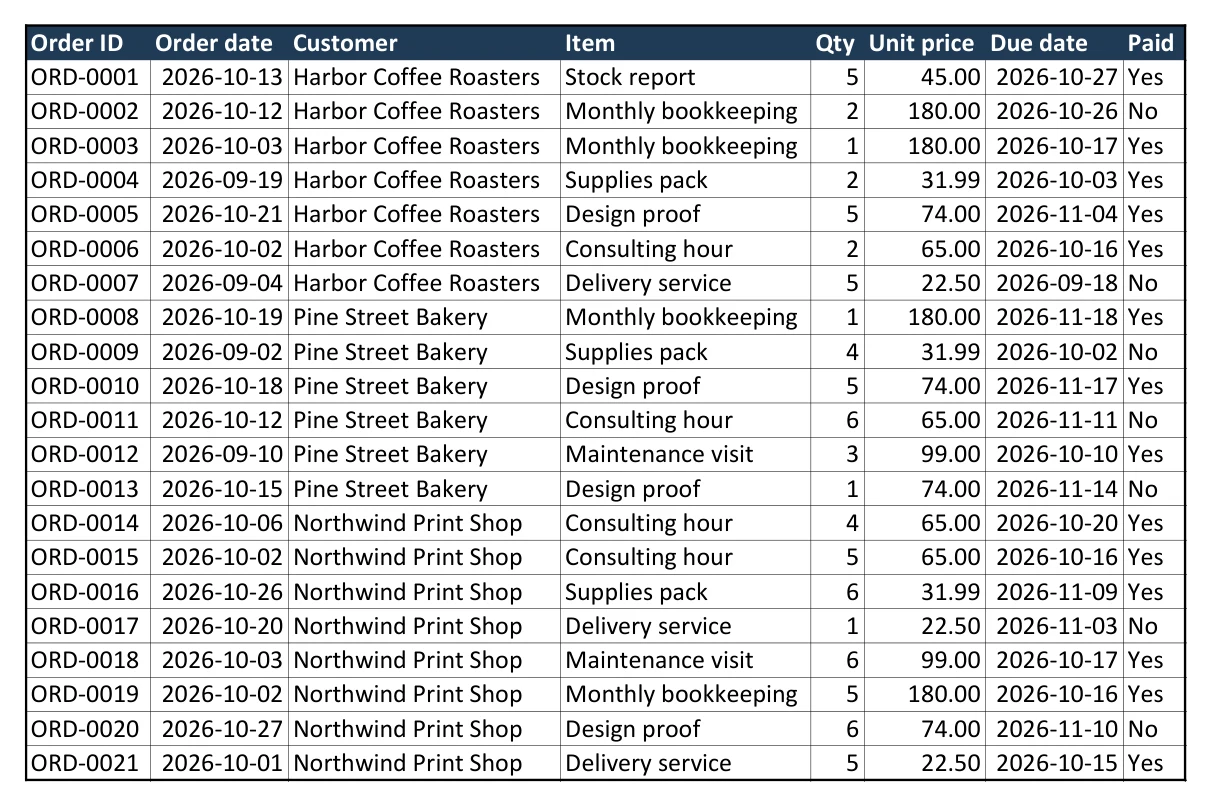
Every month the owner of a small business copies orders into a Word or Excel invoice by hand, one customer at a time, then checks by eye which invoices are late. It takes an afternoon and one typo changes a total. Here the orders go into one sheet and one click does the rest.
Before and after
What the macro does
- Checks every order row first. If a quantity is not a number, a customer is empty or an order ID repeats, a message box lists each row and nothing is built.
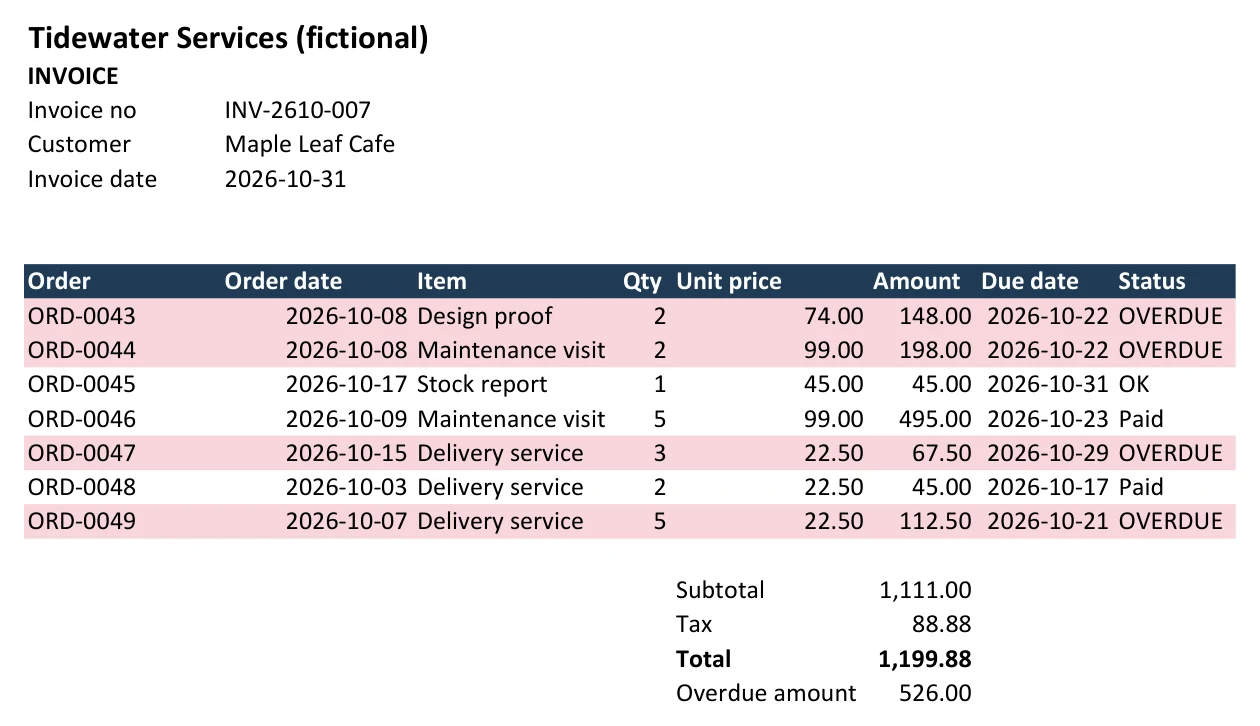
- Builds one invoice sheet per customer with the lines, subtotal, 8% tax (rounded once per invoice) and total.
- Flags a line as overdue when it is unpaid and its due date is before the as-of date (2026-10-31).
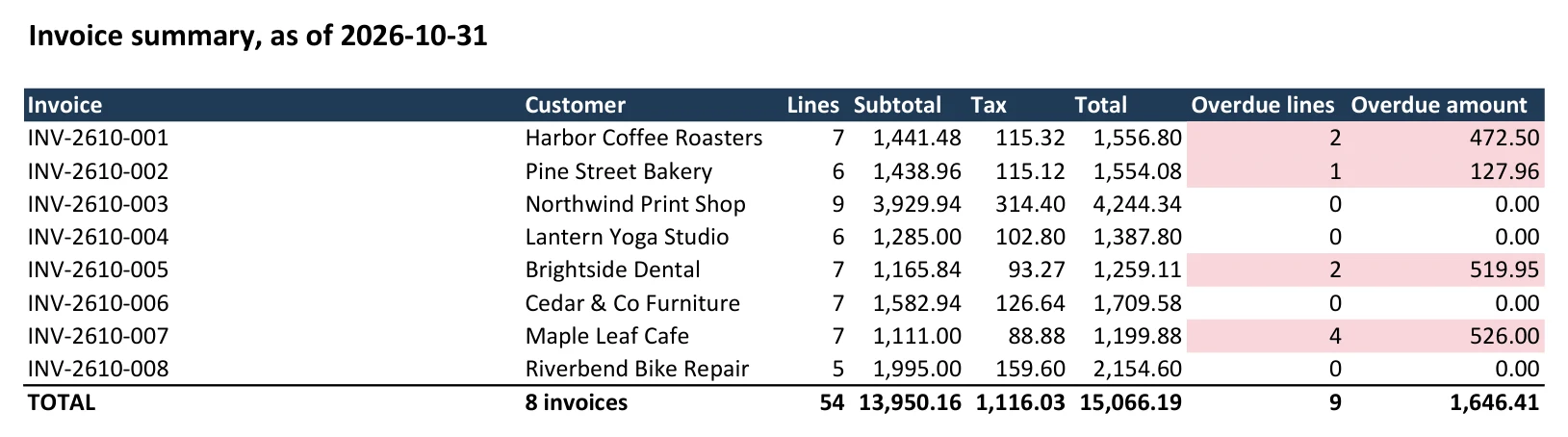
- Builds a Summary sheet with a totals row and exports it to PDF. Running it again replaces the old sheets, so nothing is duplicated.
How it was tested
- Excel macro: run in real Excel 16 on a copy of the workbook, 21 of 21 checks passed. 8 invoices, subtotal 13,950.16, tax 1,116.03, grand total 15,066.19, 9 overdue lines worth 1,646.41. Every figure equals an independent calculation in Python from the same 54 orders.
- Bad data: three damaged rows (row 4, row 7, row 9) are all reported and no invoice sheet is created. The test calls the macro in silent mode, which returns the same text the message box shows. I did not click the message box itself.
- Google Apps Script: tested with a local harness in Node that mocks SpreadsheetApp, 8 of 8 tests passed, same orders and the same totals. It has not been run on Google, so menu and permissions behaviour there is untested.
What I built
- An Excel workbook with a Read me sheet, an Orders sheet with a Yes/No drop-down, a Settings sheet (blue input cells) and a Build invoices button.
- The VBA module behind the button, and the same logic as a Google Apps Script with an Invoices menu.
- An automated test for each version, run against the same data and the same expected totals.
Built with: Excel VBA, Google Apps Script, Node (test harness), Python (expected totals)
Send a sample of your monthly sheet and I will show you the invoices it makes.Contact me