Caregiver timesheet that adds up the hours
A one-page fillable PDF timesheet for home-care staff. It works out the hours from time in, time out and break, and flags any day that needs a fix before anyone signs.
Demo project, fictional brand · Fillable form
Downloads
The problem
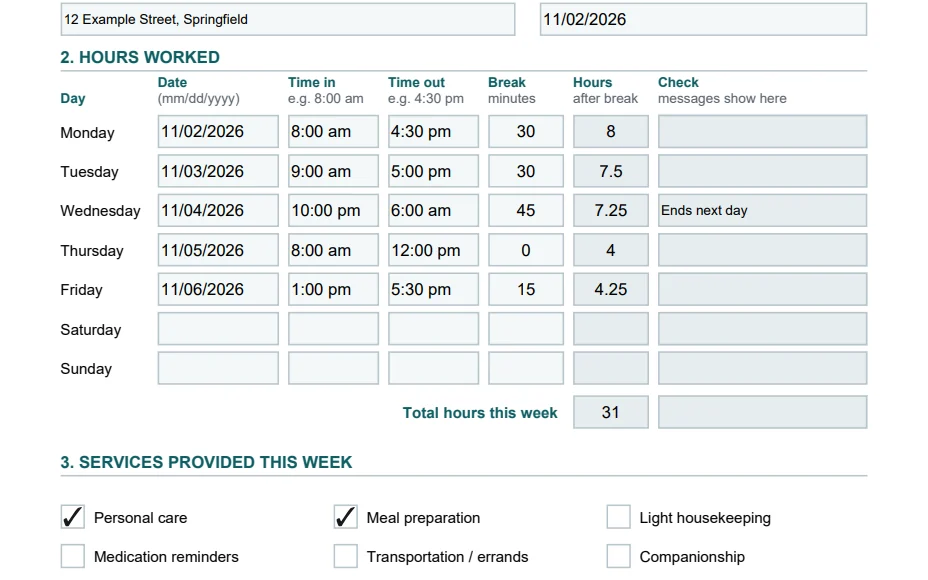
Printed timesheets get lost and miscounted. This one adds up the hours itself, subtracts the break, and says which day needs a fix before the employee and the client sign.
How to use it
- Enter the times. Type the date, time in, time out and unpaid break (whole minutes) for each day worked.
- Check the totals. The Hours column and the weekly total fill themselves. Read the Check column: it says what to fix when a time is missing, out of range or the break is too long.
- Sign and save. The employee and the client each sign and date their box, then save the file.
How it was tested
- File structure: 18 of 18 tests pass. They cover field names, tooltips and signature field type, a tooltip on all 61 fields, tab and calculation order, read-only totals, signature boxes, no overlapping fields, text of 9 pt or larger, and clean PDF syntax.
- Calculations: 31 of 31 tests pass. They run the form’s own scripts and cover break minutes, an overnight shift, missing or bad times, start equal to end, a shift over 16 hours, and the sign-again warning when hours change after signing (in a test harness, not inside Adobe Acrobat).
Tested on an Android phone in Adobe Acrobat Reader (15 November 2026): the fields fill in, but hours and totals are not calculated there. The calculation tests run the form’s scripts in a test harness, not inside Adobe Acrobat itself.
Known limits. On an Android phone in Adobe Acrobat Reader, hours and totals are not calculated; signing and saving on a phone are not yet tested. A signature drawn with a Fill & Sign tool is not detected. The PDF is not yet tagged for screen readers.
What I built
- Seven day rows: hours fill themselves from time in, time out and break, overnight shifts included; the weekly total adds up the good days and says how many days need a fix.
- A Check column on every day: it flags a missing time, a break longer than the shift, a start equal to the end, and a shift over 16 hours.
- Six service tick boxes, notes, and signature boxes with dates for the employee and the client.
- If a time or break changes after signing, the form tells both people to sign again.
Questions
How do I enter an overnight shift?
Type the real times, for example 10:00 pm and 6:00 am. An end time before the start time is read as the next day, so that is 8 hours, and the Check column says “Ends next day”.
How do breaks work?
Type the unpaid break in whole minutes. It is subtracted from the hours. Leave it empty for no break. A break longer than the shift gives no hours and a message.
What if the hours change after signing?
Both people sign again. In Adobe Acrobat the form tries to clear both signatures and dates and tells you to sign again. If your app cannot clear a signature, it still shows the warning, so remove the old signatures yourself.
Which apps does it work in?
It works best in Adobe Acrobat on a computer. Other PDF apps may not run the calculations, so the hours can stay empty. On an Android phone in Adobe Acrobat Reader the form fills in but the hours stay empty. Check the hours before signing.
Scope
This is a timesheet aid, not a replacement for EVV, payroll or local rules. It records the hours the employee and the client agree on.
Built with: Fillable PDF (AcroForm), Acrobat JavaScript for calculations